Architecture
Three layers to understand: network (public → Caddy → NetBird → AIO Apache), containers (8 AIO processes on one host, host network namespace shared with mastercontainer), and data flow (NFS for user files, local ext4 for everything else, plus a daily postgres dump that lands on NFS).
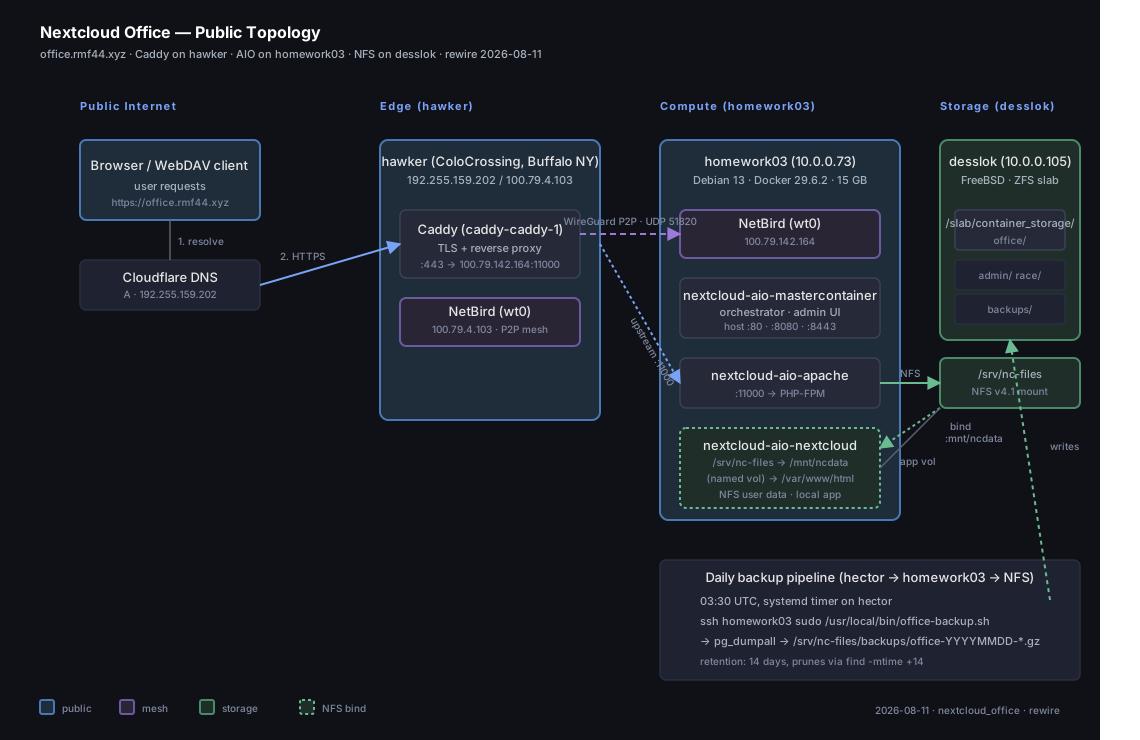
Topology — public ingress
Three active layers, plus the retired OnlyOffice tier that's been torn down:
-
Public ingress — Cloudflare DNS points
office.rmf44.xyzdirectly athawker (192.255.159.202). Caddy in thecaddy-caddy-1container terminates TLS with a Let's Encrypt cert and reverse-proxies to100.79.142.164:11000(homework03's NetBird IP, AIO Apache port). -
NetBird mesh — WireGuard P2P between hawker
(
100.79.4.103) and homework03 (100.79.142.164). Direct host-host (no relay) over UDP 51820. -
Compute + data — 8 AIO containers on homework03,
sharing host network via
network_mode: hoston the mastercontainer. Apache listens on host :11000; mastercontainer owns :80, :8080, :8443, :9000. -
Storage — NFSv4.1 from
desslok:/slab/container_storage/officemounted at/srv/nc-fileson homework03. User files live at the NFS export root (no intermediatenextcloud/subdir):admin/,race/,appdata_*/, plusbackups/for the daily backup pipeline. -
Retired (torn down) — OnlyOffice container
(
onlyoffice-files-1) on hawker, plus its nginx vhost, plus its daily backup pipeline on hector. Replaced by the AIO stack.
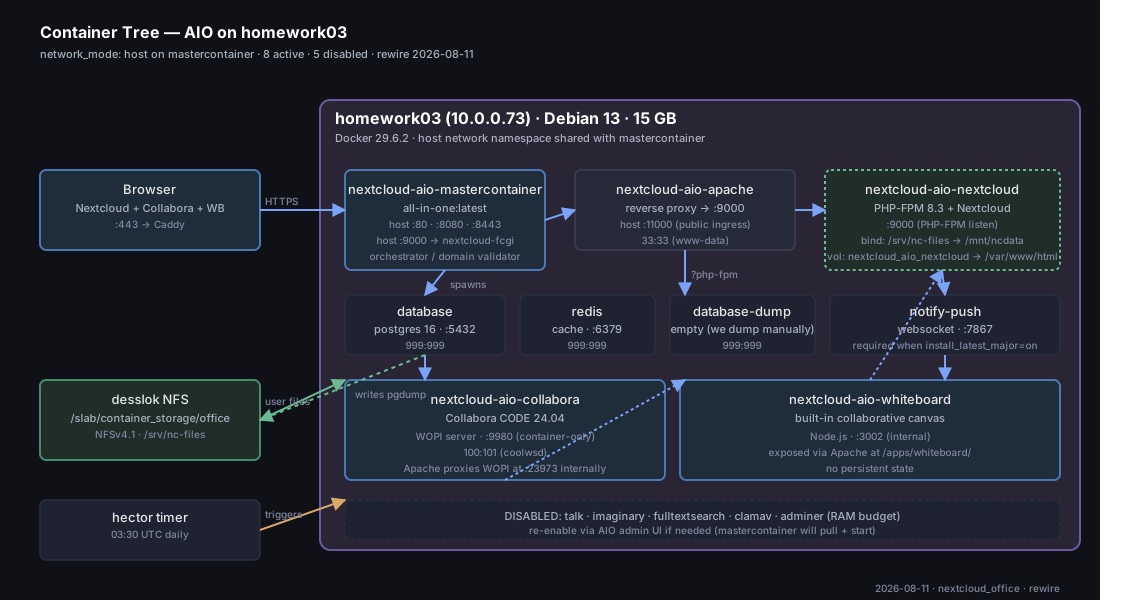
Container tree — what's running on homework03
AIO manages its own container lifecycle; you start the
mastercontainer via docker compose up -d and
it spawns the rest. Each side container has a named docker volume
bound to a host directory so the data survives mastercontainer
restarts.
| Container | Role | Bind target | Owner | Port |
|---|---|---|---|---|
nextcloud-aio-mastercontainer |
Orchestrator, domain validator, admin UI | ./nextcloud-aio-mastercontainer/ |
33:33 (www-data) |
:80 (acme), :8080 (admin UI), :8443 (alt admin), :9000 (nextcloud-fcgi via apache) |
nextcloud-aio-apache |
Reverse proxy → nextcloud-fcgi, public-facing | ./nextcloud-aio-apache/ |
33:33 |
:11000 (host) → :11000 (container) |
nextcloud-aio-nextcloud |
PHP-FPM + Nextcloud app code | ./nextcloud-aio-nextcloud/ (local volume) + /srv/nc-files (NFS) → /mnt/ncdata |
root (entrypoint) | :9000 (PHP-FPM) |
nextcloud-aio-database |
PostgreSQL 16 | ./nextcloud-aio-database/ |
999:999 |
:5432 (internal only) |
nextcloud-aio-redis |
Cache + file locking | ./nextcloud-aio-redis/ |
999:999 |
:6379 (internal only) |
nextcloud-aio-collabora |
CODE Office (Word/Excel/PowerPoint editing) | ./nextcloud-aio-collabora/ |
100:101 |
:9980 (internal only, called by apache) |
nextcloud-aio-whiteboard |
Built-in collaborative whiteboard | ./nextcloud-aio-whiteboard/ |
(n/a) | :3002 (internal only) |
nextcloud-aio-notify-push |
Push notification backend (websocket) | ./nextcloud-aio-notify-push/ |
(n/a) | :7867 (internal only) |
nextcloud-aio-imaginary |
(DISABLED — saves RAM) | — | — | — |
nextcloud-aio-fulltextsearch |
(DISABLED — saves RAM) | — | — | — |
nextcloud-aio-clamav |
(DISABLED — saves RAM) | — | — |
Why host network? The AIO mastercontainer runs
with network_mode: host so it can publish ports :80
and :8443 directly on the host's network namespace. Apache (the
sidecar) is reached via host :11000 because AIO's domain
validation flow requires mastercontainer own host :80.
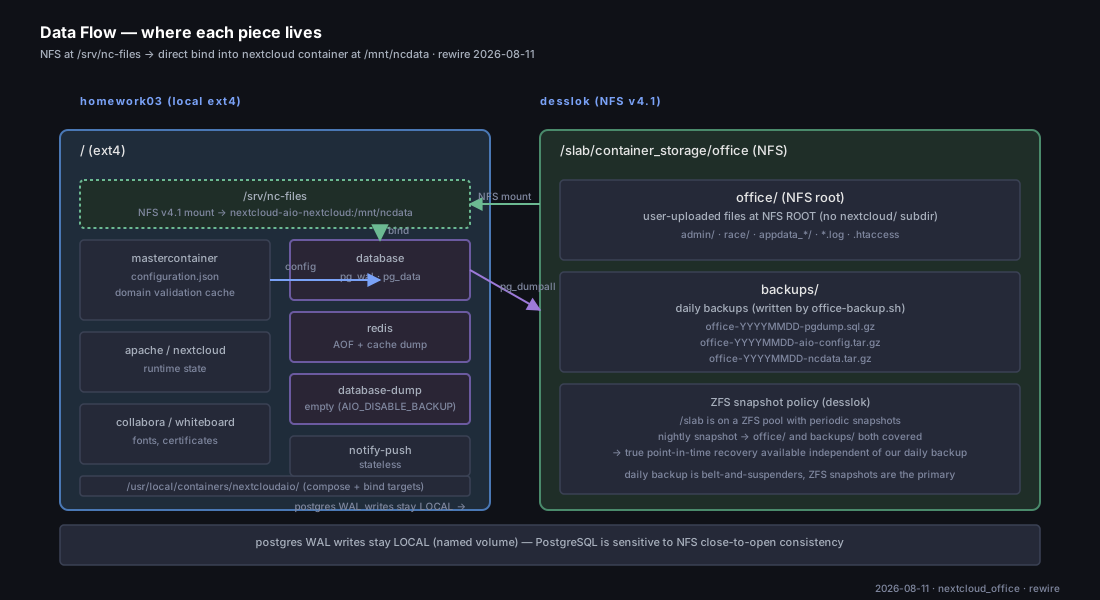
Data flow — where each piece lives
Most of AIO's user data is on NFS
(/srv/nc-files on homework03 → container bind at
/mnt/ncdata). Postgres, Redis, and the AIO
mastercontainer's configuration live on local ext4 (named
volumes) — keeping PostgreSQL's WAL writes off NFS is critical
for durability.
| Path | Filesystem | Why |
|---|---|---|
/srv/nc-files/ (NFS root on homework03) |
NFSv4.1 from desslok | User-uploaded files live at the export root: admin/, race/, appdata_*/, etc. The nextcloud container binds this path to /mnt/ncdata directly. Snapshotted daily via desslok's ZFS path. |
/srv/nc-files/backups/ |
NFSv4.1 from desslok | Daily pgdump + AIO config tar + user-files tar. 14-day retention. |
/usr/local/containers/nextcloudaio/nextcloud-aio-nextcloud/_data/ |
ext4 (local) | Local named-volume bind for the nextcloud container. AIO-managed; NEXTCLOUD_DATADIR points at /srv/nc-files separately, NOT at this volume. |
/usr/local/containers/nextcloudaio/nextcloud-aio-{mastercontainer,database,redis,apache,...}/ |
ext4 (local) | Named-volume bind targets per container. Each holds the writable state for that one container. |
Rewire 2026-08-11: before the rewire, AIO
bind-mounted a third host layer
(/mnt/nc-data/nextcloud-data) into the nextcloud
container, with NEXTCLOUD_DATADIR=/mnt/nc-data/nextcloud-data.
That double-bind worked but had two sharp edges: (a) the
NEXTCLOUD_DATADIR host path and the actual NFS
mount path had to be kept in sync manually; (b) a typo would
silently create an empty datadir, masking the real NFS data
and triggering an "Appdata is not present" crash on next
start. The rewire collapses both to a single layer:
/srv/nc-files is the NFS mount AND the
NEXTCLOUD_DATADIR value — AIO binds it directly
into the nextcloud container at /mnt/ncdata.
Why isn't the postgres data on NFS?
PostgreSQL's WAL writes are sensitive to NFS close-to-open
consistency. The official AIO image puts the database on a local
named volume by default and we kept that. pg_dumpall
(which is what the backup pipeline runs) produces a
crash-consistent snapshot at dump time, so the daily backup is
good — but live writes from postgres go to local ext4 only.
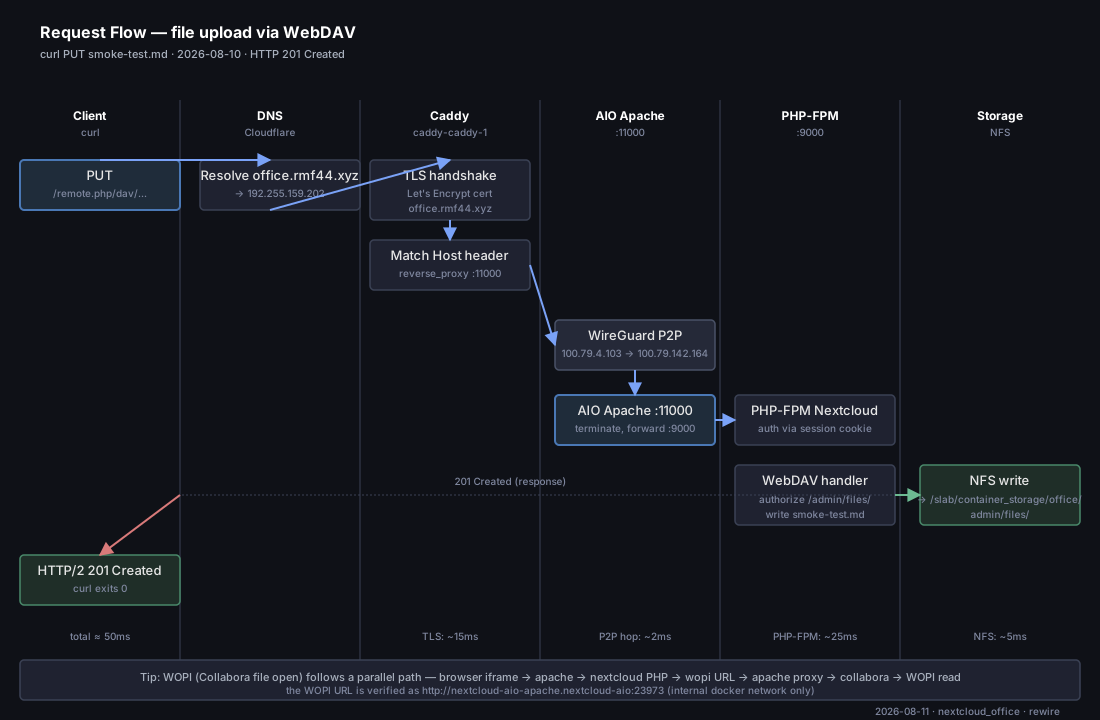
Request flow — file upload via WebDAV
Swimlane sequence diagram of a single file upload:
curl -T smoke-test.md https://office.rmf44.xyz/remote.php/dav/files/admin/smoke-test.md
as run during the smoke test on 2026-08-10:
- DNS —
office.rmf44.xyzresolves to192.255.159.202(hawker). - TLS handshake — Caddy presents the Let's Encrypt cert for
office.rmf44.xyz. - HTTPS PUT arrives at hawker on :443 with path
/remote.php/dav/files/admin/smoke-test.md. - Caddy route matches the
Host: office.rmf44.xyzblock and forwards to100.79.142.164:11000. - NetBird tunnel encapsulates the request in WireGuard (UDP 51820), P2P from hawker to homework03.
- AIO Apache (nextcloud-aio-apache container) terminates the TLS-stripped HTTP and forwards to
127.0.0.1:9000(PHP-FPM in nextcloud-aio-nextcloud). - PHP-FPM (Nextcloud) authenticates the user via the session cookie, authorizes the path under
/admin/files/, and writes the file via WebDAV. - NFS write of the file to
/srv/nc-files/admin/files/smoke-test.mdon homework03 →/slab/container_storage/office/admin/files/smoke-test.mdon desslok (nextcloud container's/mnt/ncdatais bound to/srv/nc-filesdirectly). - Response:
HTTP/2 201 Createdwith empty body (WebDAV semantics).
Collabora editing flow
When a user opens a .docx in the web UI, Nextcloud embeds Collabora in an iframe via WOPI. The full chain:
- User clicks "Open in Collabora" in the Nextcloud file UI.
- Nextcloud generates a one-time WOPI token for the file.
- Iframe loads
https://office.rmf44.xyz/apps/richdocuments/index?fileId=123&requesttoken=.... - Browser fetches the iframe content from Caddy → Apache → PHP-FPM.
- PHP-FPM serves the richdocuments app HTML.
- Browser opens a second HTTPS connection to
https://office.rmf44.xyz:9980... no, actually: AIO proxies Collabora internally athttp://nextcloud-aio-apache.nextcloud-aio:23973. The browser never sees Collabora directly. - Collabora loads the file via WOPI (read from Nextcloud's WebDAV), serves the editor in the iframe, autosaves back through WOPI.
Verified: docker exec nextcloud-aio-nextcloud
sudo -u www-data php occ config:app:get richdocuments wopi_url
returned http://nextcloud-aio-apache.nextcloud-aio:23973
— internal network address, not exposed publicly. The WOPI secret
never leaves the docker network.